Examples Using the Programs
Example Commands Using Pipes
The example commands below each image can be typed, or cut and pasted,
onto the command line. Each command creates the particular model and
loads it into the antiview viewer so it can be examined.
Tip: when using a DOS box in Windows enable command line recall
with the doskey /insert command. Previous commands are
recalled with the up arrow, and can be edited to test changes or
correct errors. This saves a lot of typing.

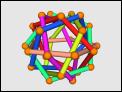
unipoly 75 | off_color -f P | antiview
|

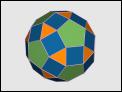
geodesic -M p 8 | antiview -v b -x ef
|

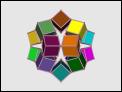
unipoly icosahedron | poly_weave | off_color -f U -e F | antiview -v 0.1 -x f
|

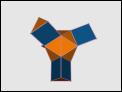
geodesic 5 | off_color -v 0.9,0.0,0.0 -f 1.0,1.0,1.0 | antiview -E 0.3,0.3,0.3 -v 0.04 -e 0.02
|

string_art -l 20 -T 0,0,0.707 -R 0,0,45 -l 20 -T 0,0,-0.707 -R 0,0,-45 | off_color -e 1.0,1.0,0.7 -v 1.0,0.2,0.0 | poly_kscope -s O | antiview -v 0.03 -B 0,0,0
|

unipoly truncated ico | zono -m v | off_color -f 0.4,0.4,0.9 -v 0,0,0 | antiview -v 0.15
|

unipoly truncated ico | zono -m v |pol_recip -r e -c C| off_color -f P -v 1.0,1.0,1.0 -s 12| antiview -v 0.08 -e 0.08 -E 1.0,1.0,1.0
|

unitile2d -s t -l 90 -w 30 11 | off_color -f N -v 1.0,0.0,0.0 -s 8 -S 0.6 -V 1| antiview -v 0.03 -e 0.025 -E 0.8,0.8,0.8
|
Example Constructions
Select a model for a detailed explanation of how to build it
using the Antiprism programs.
Next:
Example: Compound of a Cube and Octahedron
Up:
Polyhedron Modelling Software
|